Why percent complete is the wrong unit
Most rope access companies report progress as a single percentage per building. The number feels precise, but nobody can verify it. A coordinator hears 60% from the crew lead on Tuesday and 55% from a different lead on Wednesday, and neither is lying. They are counting different things.
Facade work is done in drops. A drop is one descent down one section of one face. If you know how many drops each face needs and how many are finished, the percentage calculates itself and every number on the dashboard traces back to a physical event on the rope.
Set up the building before the first drop
Before crews arrive, define the building by cardinal face: north, south, east, and west. Some towers need more segments, for example a podium level or an inset courtyard, but four faces cover most commercial high-rises.
For each face, record the planned drop count. Count from the roof plan or from a previous job on the same building. A 30-storey tower with a 40-metre north face and 3-metre drop widths needs roughly 13 or 14 drops on that side. Write the number down. It becomes the denominator for everything that follows.
Log every drop with evidence
A drop is complete when the technician reaches the bottom anchor and submits three things: a photo, a GPS coordinate, and a timestamp. The photo shows the work. The coordinate proves the technician was on site. The timestamp orders the drops so a supervisor can reconstruct the day.
Do not let drops be logged from the office on behalf of the crew. The moment progress is entered second-hand, the trail breaks and you are back to trusting a verbal report.
Read progress face by face, not building by building
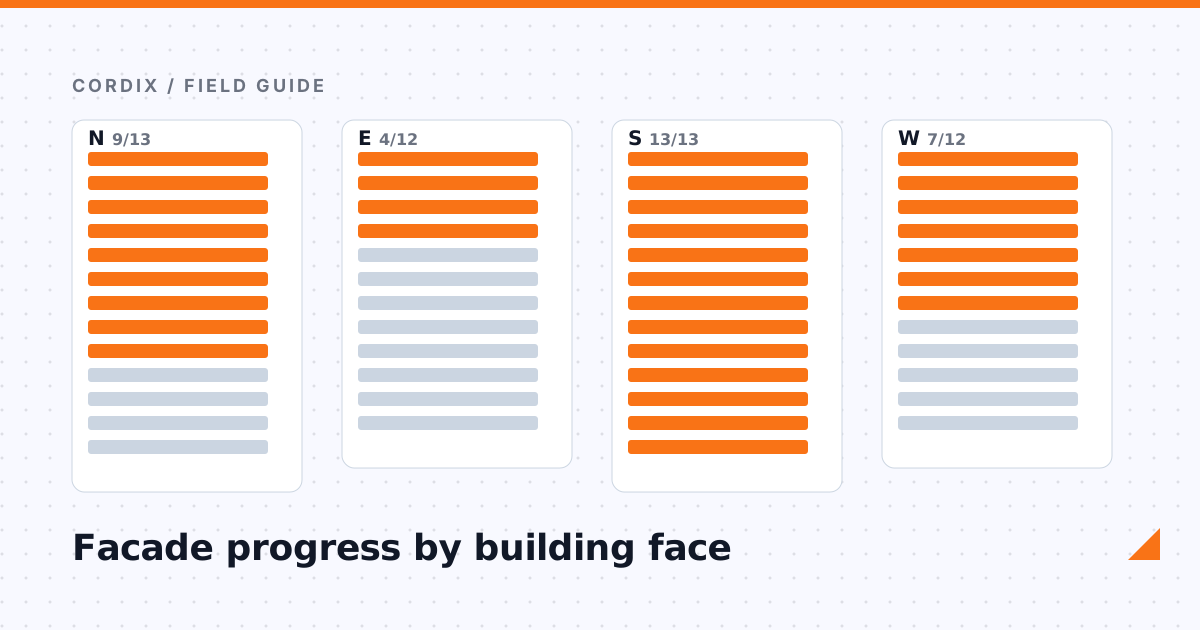
With drops logged per face, the dashboard answers questions the old percentage never could. Which face is exposed to tomorrow's wind and how much is left on it? Can the west crew move to the south face on Thursday? Is the north face far enough along to schedule the client walk-through?
This is also what property managers want to see. A daily report that says north face 9 of 13 drops, with photos, is a report they forward to the building owner without editing.
Handle rework and partial drops honestly
Two situations trip up simple counters. First, a drop that is stopped mid-descent because of wind or a rescue drill. Log it as incomplete with a note and let the technician finish it as a new submission later. Second, a drop that has to be redone after a client inspection. Add it as an additional drop on that face rather than resetting the count, so the record shows the extra work and the schedule impact.
The goal is a log that matches what happened on the building, not a log that looks tidy.
See face-by-face tracking in Cordix
Cordix records every drop with a photo, GPS position, and timestamp, and rolls them up per face on the project dashboard.
Request a demo